
Single Sign-On for Four Rails Apps: Self-Hosted Ory With Docker Compose
By Giovanni Panasiti
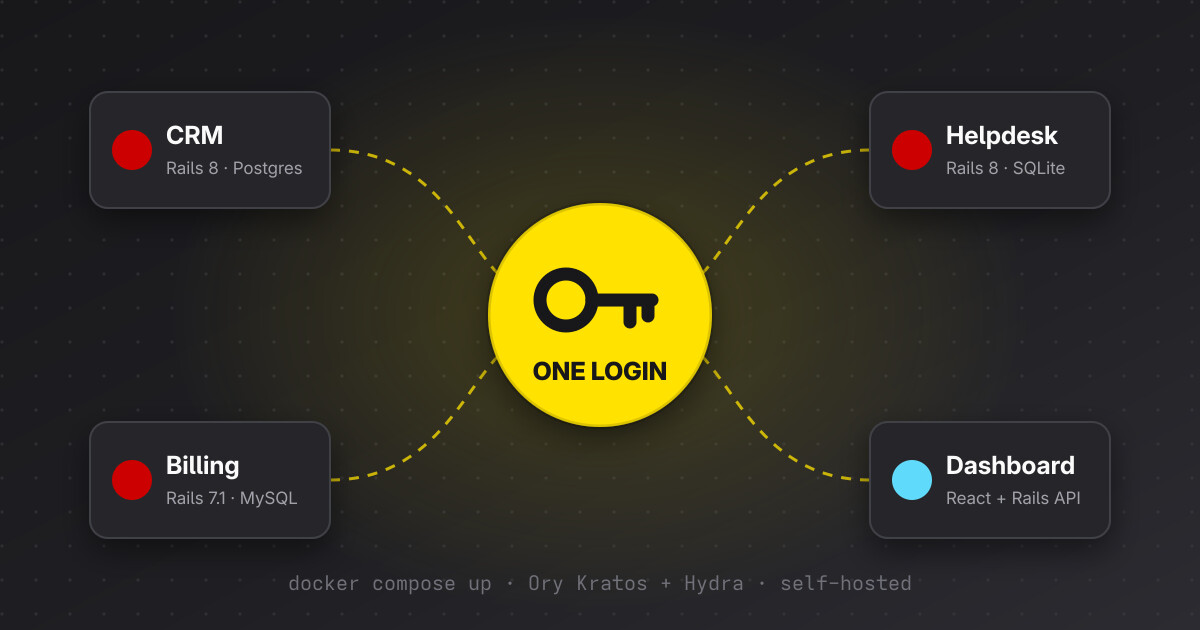
With a coding agent, a new Rails app is an afternoon of work. You describe it and the agent writes most of it. Four apps are four afternoons. Writing the code is no longer the hard part.
The hard part starts when those four apps have to share something, like the login. Ask an agent to add authentication to each app and you get four Devise setups and four users tables. Each answer is correct inside its own repository. Together they give you four places where a leaked password works. When someone leaves the company, you remove them four times. When someone asks for two-factor authentication, you build it four times.
Authentication across several apps needs a shared design. A coding agent can help implement it, but you still need to choose where identities live, how applications authenticate users, and how sessions end. This guide explains those decisions using Ory Kratos, Ory Hydra and OpenID Connect.
The fix is one login for all of them. In this guide we build it with Ory, self-hosted, with Docker Compose. Every file below comes from a companion project I ran on my laptop with Ory v26.2.0 and Rails 8.1. Where something broke, I say what broke.
The four apps
The target scenario is four apps that look nothing alike under the hood. The design has to fit all of them. The companion project implements two, CRM and Billing, as Rails 8.1 apps on SQLite. The Dashboard’s login and API checks are tested from the CRM. The other stacks in the table are the target, and I haven’t run those exact four implementations.
| App | Stack | Today |
|---|---|---|
| CRM | Rails 8.1, PostgreSQL | Devise, the oldest user base |
| Billing | Rails 7.1, MySQL 8 | has_secure_password |
| Helpdesk | Rails 8.1, SQLite, Solid Queue | another VPS, another domain |
| Dashboard | React SPA + Rails API-only, PostgreSQL | tokens in localStorage, don’t ask |
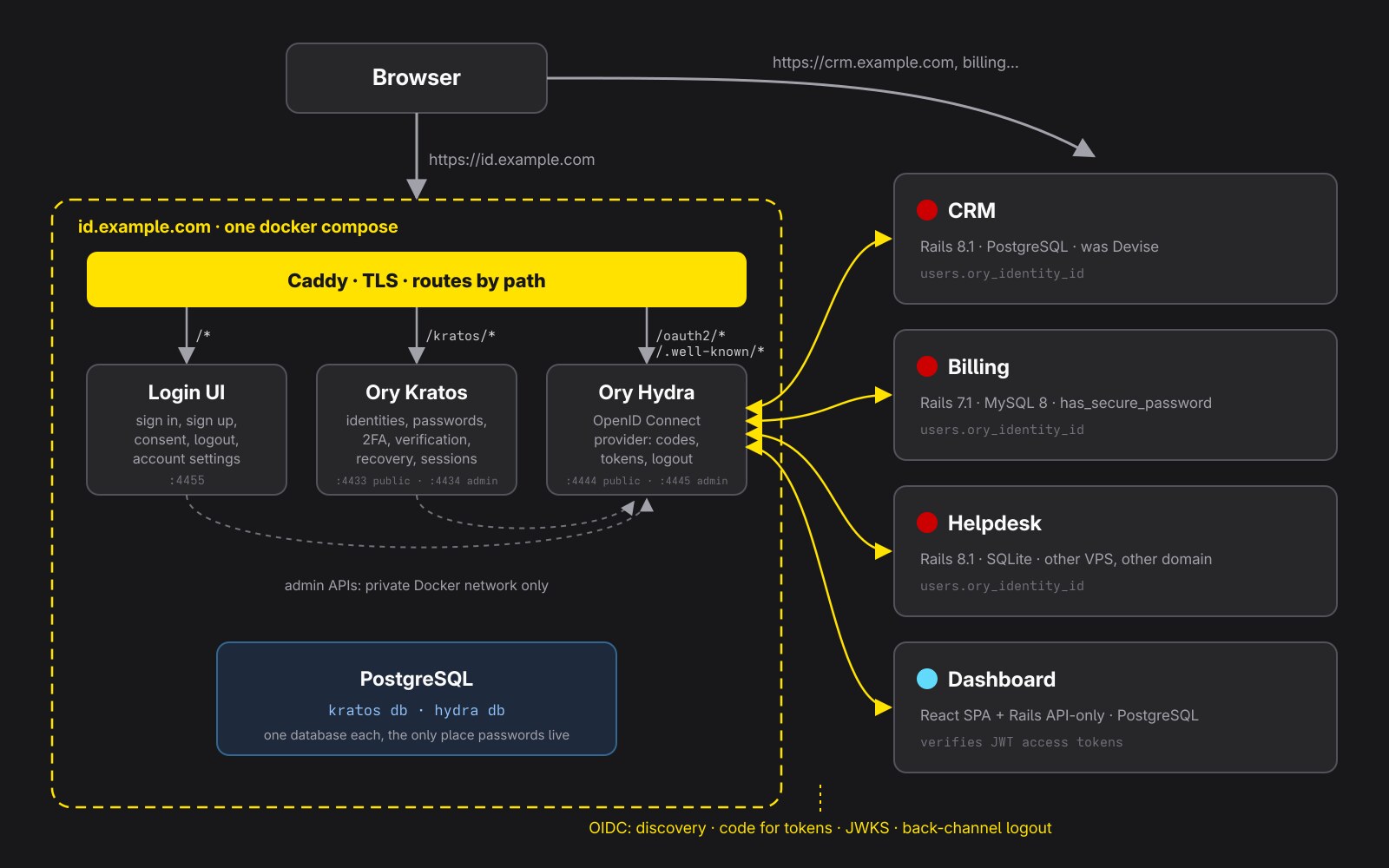
Each app keeps its own database and its own users table. We add one column, ory_identity_id, and the apps stop storing passwords. The database engine doesn’t matter, because the apps never share a table. They share a login server.
Why Ory, and why two of its parts
Ory is a set of open source identity servers written in Go, under the Apache 2.0 license. Two of them matter here.
Ory Kratos manages identities, credentials, verification, recovery and authentication sessions. Ory Hydra manages OAuth2 clients and issues OAuth2 and OpenID Connect tokens. Kratos’s built-in Hydra integration connects the authentication flow to Hydra’s login challenge.
Hydra stores no users and shows no login page. When it needs a login, it redirects to a login UI that you supply.
You can run Kratos alone. Every app reads the Kratos session cookie and calls /sessions/whoami on each request. I like this for two apps on subdomains of one domain. With Kratos alone, every app talks an API that only Ory speaks. Direct browser-cookie sharing works within the cookie’s domain scope. For applications on unrelated domains, Hydra provides a standard OpenID Connect redirect flow, so each app can establish its own local session.
With Hydra in front, every app speaks plain OpenID Connect. In Rails that’s the omniauth_openid_connect gem and an initializer. The domain of each app doesn’t matter. Using OpenID Connect gives the apps a standard integration. Moving to another provider would still require updating configuration and mapping identities and claims. That’s the setup we build.
The third container is the login UI. Ory publishes kratos-selfservice-ui-node, an Express app with sign in, sign up, recovery, settings, consent and logout pages. We use it as it is. You can restyle it or write your own later.
How one login moves
The first time you sign in, the browser takes twelve steps. Most of them are redirects you never see.
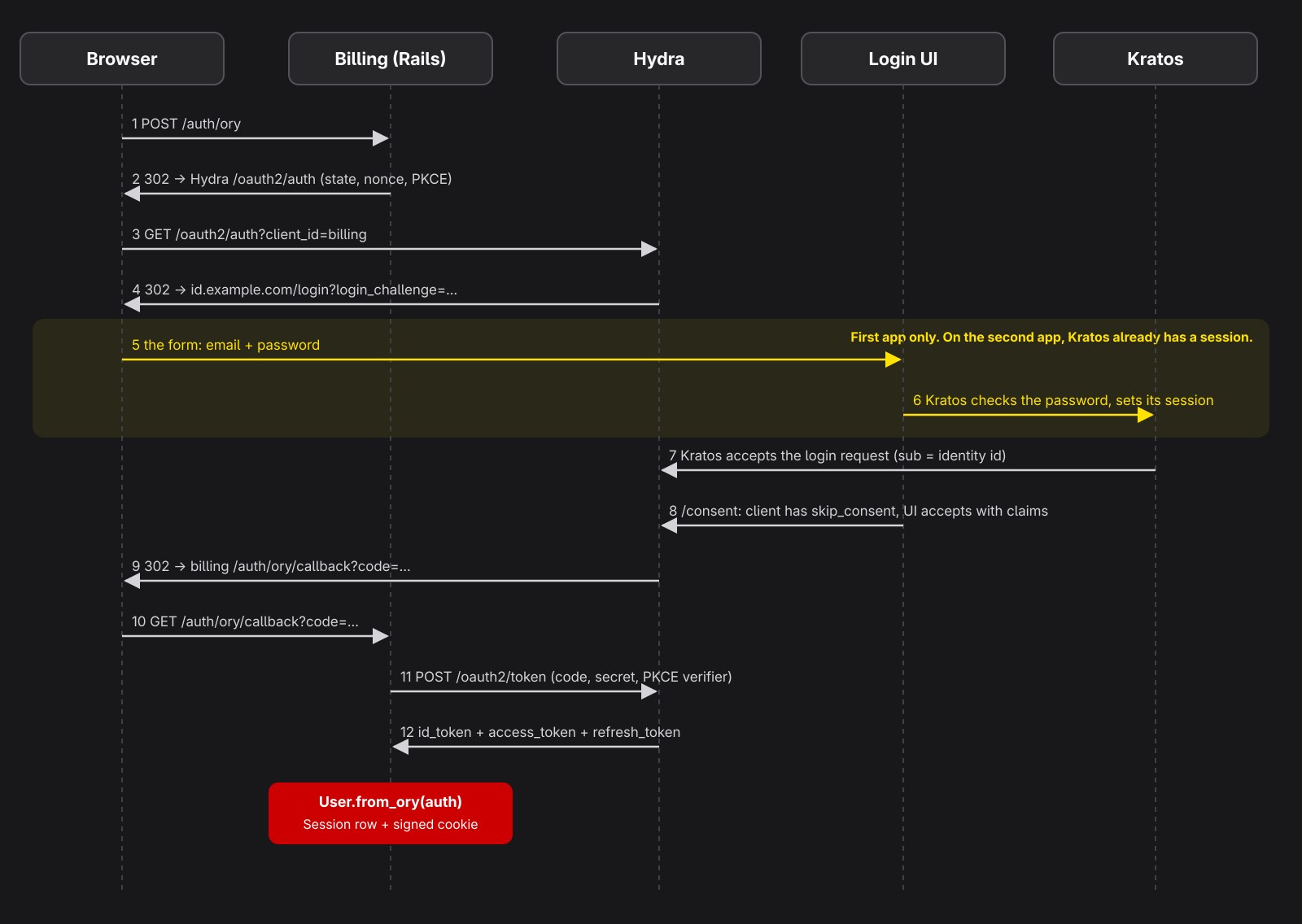
The yellow band is the only part where a human types something. When you then open Billing, Hydra sends you to the login UI, and the UI finds a live Kratos session. You’re back in Billing with a code. In my lab that hop took 914 ms on a laptop, and nobody saw a form.
The Ory stack in one Compose file
This is the development setup. The browser-facing services and development admin APIs are published only on localhost, using plain HTTP. Cookies ignore ports, so the login UI on 4455 and Kratos on 4433 share cookies, the same way they share a host in production.
ory-sso/
├── docker-compose.yml
├── register-clients.sh
└── ory/
    ├── postgres/init.sql
    ├── kratos/kratos.yml
    ├── kratos/identity.schema.json
    └── hydra/hydra.yml
# docker-compose.yml
name: ory-sso-dev

x-ory-env: &ory-env
  LOG_LEVEL: info

services:
  postgres:
    image: postgres:17-alpine
    environment:
      POSTGRES_USER: ory
      POSTGRES_PASSWORD: ${ORY_DB_PASSWORD:-ory-dev-password}
      POSTGRES_DB: ory
    volumes:
      - ./ory/postgres/init.sql:/docker-entrypoint-initdb.d/init.sql:ro
      - ory-postgres:/var/lib/postgresql/data
    healthcheck:
      test: ["CMD-SHELL", "pg_isready -U ory"]
      interval: 3s
      retries: 20

  kratos-migrate:
    image: oryd/kratos:v26.2.0
    command: migrate sql -e --yes
    environment:
      DSN: postgres://ory:${ORY_DB_PASSWORD:-ory-dev-password}@postgres:5432/kratos?sslmode=disable
    depends_on:
      postgres: { condition: service_healthy }

  kratos:
    image: oryd/kratos:v26.2.0
    command: serve -c /etc/config/kratos/kratos.yml --dev --watch-courier
    environment:
      <<: *ory-env
      DSN: postgres://ory:${ORY_DB_PASSWORD:-ory-dev-password}@postgres:5432/kratos?sslmode=disable
    volumes:
      - ./ory/kratos:/etc/config/kratos:ro
    ports:
      - "127.0.0.1:4433:4433" # public
      - "127.0.0.1:4434:4434" # admin API, localhost only
    depends_on:
      kratos-migrate: { condition: service_completed_successfully }

  hydra-migrate:
    image: oryd/hydra:v26.2.0
    command: migrate sql up -e --yes
    environment:
      DSN: postgres://ory:${ORY_DB_PASSWORD:-ory-dev-password}@postgres:5432/hydra?sslmode=disable
    depends_on:
      postgres: { condition: service_healthy }

  hydra:
    image: oryd/hydra:v26.2.0
    command: serve all -c /etc/config/hydra/hydra.yml --dev
    environment:
      <<: *ory-env
      DSN: postgres://ory:${ORY_DB_PASSWORD:-ory-dev-password}@postgres:5432/hydra?sslmode=disable
    volumes:
      - ./ory/hydra:/etc/config/hydra:ro
    ports:
      - "127.0.0.1:4444:4444" # public: /oauth2/auth, /oauth2/token, /.well-known
      - "127.0.0.1:4445:4445" # admin API, localhost only
    extra_hosts:
      - "host.docker.internal:host-gateway" # dev only: lets Hydra call the Rails apps on your laptop
    depends_on:
      hydra-migrate: { condition: service_completed_successfully }

  login-ui:
    image: oryd/kratos-selfservice-ui-node:v26.2.0
    environment:
      PORT: 4455
      KRATOS_PUBLIC_URL: http://kratos:4433/
      KRATOS_BROWSER_URL: http://127.0.0.1:4433/
      HYDRA_ADMIN_URL: http://hydra:4445 # no trailing slash
      COOKIE_SECRET: ${UI_COOKIE_SECRET:-change-me-32-chars-long-xxxxxxxxx}
      CSRF_COOKIE_NAME: ory_ui_csrf
      CSRF_COOKIE_SECRET: ${UI_CSRF_SECRET:-change-me-too-32-chars-xxxxxxxxx}
      DANGEROUSLY_DISABLE_SECURE_CSRF_COOKIES: "true" # dev only, we're on plain http
    ports:
      - "127.0.0.1:4455:4455"
    depends_on: [kratos, hydra]

  mailpit:
    image: axllent/mailpit:latest
    ports:
      - "127.0.0.1:8025:8025" # web UI to read verification and recovery emails

volumes:
  ory-postgres:
-- ory/postgres/init.sql
CREATE DATABASE kratos;
CREATE DATABASE hydra;
One PostgreSQL server holds two databases, and Kratos and Hydra never read each other’s tables. The two *-migrate services run once and exit. The migration services update the database schema before the servers start. For upgrades, review the release notes, back up the databases and test the new versions before deployment.
Look at the comment on HYDRA_ADMIN_URL. My first version had http://hydra:4445/ with a trailing slash. Sign up and email verification worked. Then the consent page returned a 500. The UI builds its URLs as HYDRA_ADMIN_URL + "/admin/...", so it called //admin/oauth2/auth/requests/consent and Hydra said no. I found it in the login UI’s log, where the URL had two slashes in it.
The 127.0.0.1: prefix on every port matters. A plain "4434:4434" publishes the port on all host interfaces, admin API included, to anyone on your network. Mailpit catches every email Kratos sends. Open http://127.0.0.1:8025 to read the verification codes.
Kratos: who your users are
Kratos needs to know what a user looks like. That’s a JSON Schema, and the ory.sh/kratos block says which field is the login and where verification and recovery codes go.
{
  "$id": "https://example.com/identity.schema.json",
  "$schema": "http://json-schema.org/draft-07/schema#",
  "title": "Person",
  "type": "object",
  "properties": {
    "traits": {
      "type": "object",
      "properties": {
        "email": {
          "type": "string",
          "format": "email",
          "title": "Email",
          "maxLength": 320,
          "ory.sh/kratos": {
            "credentials": {
              "password": { "identifier": true },
              "totp": { "account_name": true }
            },
            "verification": { "via": "email" },
            "recovery": { "via": "email" }
          }
        },
        "name": {
          "type": "object",
          "properties": {
            "first": { "type": "string", "title": "First name", "maxLength": 100 },
            "last": { "type": "string", "title": "Last name", "maxLength": 100 }
          }
        }
      },
      "required": ["email"],
      "additionalProperties": false
    }
  }
}
Keep the schema small. Roles and plans stay in each app, where they already live. Kratos answers one question, “who is this?”, and each app answers “what can they do here?”.
# ory/kratos/kratos.yml
version: v26.2.0

serve:
  public:
    base_url: http://127.0.0.1:4433/
    cors:
      enabled: true
  admin:
    base_url: http://kratos:4434/

selfservice:
  default_browser_return_url: http://127.0.0.1:4455/
  allowed_return_urls:
    - http://127.0.0.1:4455

  methods:
    password:
      enabled: true
    totp:
      enabled: true
      config:
        issuer: Example SSO
    link:
      enabled: true
    code:
      enabled: true

  flows:
    error:
      ui_url: http://127.0.0.1:4455/error
    settings:
      ui_url: http://127.0.0.1:4455/settings
      privileged_session_max_age: 15m
    recovery:
      enabled: true
      ui_url: http://127.0.0.1:4455/recovery
      use: code
    verification:
      enabled: true
      ui_url: http://127.0.0.1:4455/verification
      use: code
      after:
        default_browser_return_url: http://127.0.0.1:4455/
    logout:
      after:
        default_browser_return_url: http://127.0.0.1:4455/login
    login:
      ui_url: http://127.0.0.1:4455/login
      lifespan: 10m
    registration:
      ui_url: http://127.0.0.1:4455/registration
      lifespan: 10m
      after:
        password:
          hooks:
            - hook: session
            - hook: show_verification_ui

session:
  lifespan: 720h
  cookie:
    name: ory_kratos_session
    same_site: Lax

log:
  level: info
  format: text

secrets:
  cookie:
    - change-me-kratos-cookie-secret-32-chars-min
  cipher:
    - 32-long-secret-not-secure-AT-ALL

ciphers:
  algorithm: xchacha20-poly1305

hashers:
  algorithm: bcrypt
  bcrypt:
    cost: 12

identity:
  default_schema_id: default
  schemas:
    - id: default
      url: file:///etc/config/kratos/identity.schema.json

courier:
  smtp:
    connection_uri: smtp://mailpit:1025/?disable_starttls=true
    from_address: no-reply@example.com
    from_name: Example SSO

oauth2_provider:
  url: http://hydra:4445
Three settings in this file do the real work.
oauth2_provider is the bridge. It tells Kratos where Hydra’s admin API is. When the login UI starts a Kratos login with a login_challenge from Hydra, Kratos checks the password and then accepts the Hydra login request itself, with the Kratos identity id as the OpenID sub. Without this line you’d write that glue code yourself.
show_verification_ui doesn’t break the redirect. I expected the verification step to strand new users on the login server. It doesn’t. In the lab, a new user signed up from the CRM and typed the six-digit code from Mailpit. The next page was the CRM, signed in. The OAuth2 context survives the detour.
bcrypt for new passwords. Kratos supports importing existing bcrypt password hashes, so compatible Devise users can retain their passwords. This lab also uses bcrypt for newly created passwords. More on the import below.
Hydra: the part your apps talk to
# ory/hydra/hydra.yml
serve:
  cookies:
    same_site_mode: Lax
  public:
    cors:
      enabled: true
      allowed_origins:
        - http://127.0.0.1:5173
      allowed_headers: [Authorization, Content-Type]

urls:
  self:
    issuer: http://127.0.0.1:4444
  login: http://127.0.0.1:4455/login
  consent: http://127.0.0.1:4455/consent
  logout: http://127.0.0.1:4455/logout

secrets:
  system:
    - change-me-hydra-system-secret-at-least-32-chars

oidc:
  subject_identifiers:
    supported_types: [public]

ttl:
  access_token: 1h
  refresh_token: 720h
  id_token: 1h
  auth_code: 10m
The issuer is the one value to copy with care. Every app compares it, byte for byte, with the iss claim in every token. http://127.0.0.1:4444 and http://127.0.0.1:4444/ are two different issuers. Pick one, then paste the same string into every app’s environment.
The CORS block is for the React app, which calls the token endpoint from the browser. The three server-side Rails apps never need it.
Start everything and ask Hydra who it is:
docker compose up -d
curl -s http://127.0.0.1:4444/.well-known/openid-configuration | jq '{issuer, authorization_endpoint, token_endpoint}'
{
  "issuer": "http://127.0.0.1:4444",
  "authorization_endpoint": "http://127.0.0.1:4444/oauth2/auth",
  "token_endpoint": "http://127.0.0.1:4444/oauth2/token"
}
One client per app
Each app is an OAuth2 client in Hydra, with its own id and secret, and a list of redirect URLs Hydra accepts. I keep two scripts in the repo. The one below is for development only: it uses localhost URLs and development secrets, and it deletes and recreates every client, which resets them. The production script is in the production section.
#!/usr/bin/env bash
# ory-dev/register-clients.sh
# DEVELOPMENT ONLY. Registers one OAuth2 client per Rails app with localhost URLs
# and development secrets. It deletes and recreates every client, which resets them.
# For production, use ory-production/register-clients.sh.
set -euo pipefail

HYDRA="docker compose exec -T hydra hydra"
ADMIN="--endpoint http://127.0.0.1:4445"

register() {
  local id=$1 name=$2 port=$3 secret=$4
  $HYDRA delete oauth2-client "$id" $ADMIN >/dev/null 2>&1 || true
  $HYDRA create oauth2-client $ADMIN \
    --id "$id" \
    --secret "$secret" \
    --name "$name" \
    --grant-type authorization_code,refresh_token \
    --response-type code \
    --scope openid,offline_access,email,profile \
    --token-endpoint-auth-method client_secret_basic \
    --redirect-uri "http://127.0.0.1:${port}/auth/ory/callback" \
    --post-logout-callback "http://127.0.0.1:${port}/" \
    --backchannel-logout-callback "http://host.docker.internal:${port}/auth/ory/backchannel_logout" \
    --skip-consent \
    --skip-logout-consent \
    --format json-pretty | jq '{client_id, client_name, redirect_uris}'
}

register crm       "CRM"        3001 "${CRM_SECRET:-crm-dev-secret}"
register billing   "Billing"    3002 "${BILLING_SECRET:-billing-dev-secret}"
register helpdesk  "Helpdesk"   3003 "${HELPDESK_SECRET:-helpdesk-dev-secret}"

# The fourth app is a React SPA in front of a Rails API: a public client with PKCE, no secret.
$HYDRA delete oauth2-client dashboard $ADMIN >/dev/null 2>&1 || true
$HYDRA create oauth2-client $ADMIN \
  --id dashboard \
  --name "Dashboard" \
  --grant-type authorization_code,refresh_token \
  --response-type code \
  --scope openid,offline_access,email,profile \
  --token-endpoint-auth-method none \
  --access-token-strategy jwt \
  --audience https://api.example.com \
  --redirect-uri http://127.0.0.1:5173/callback \
  --post-logout-callback http://127.0.0.1:5173/ \
  --allowed-cors-origin http://127.0.0.1:5173 \
  --skip-consent \
  --skip-logout-consent \
  --format json-pretty | jq '{client_id, client_name, redirect_uris}'
--skip-consent matters more than it looks. Without it, the first time someone opens each app they see “CRM wants to access your email and profile. Allow?”. That screen is right for a third-party app. For your own four apps it’s noise, and people learn to click Allow without reading. The login UI checks the flag on the client and accepts consent on the user’s behalf. --skip-logout-consent does the same for the “Do you want to log out?” page.
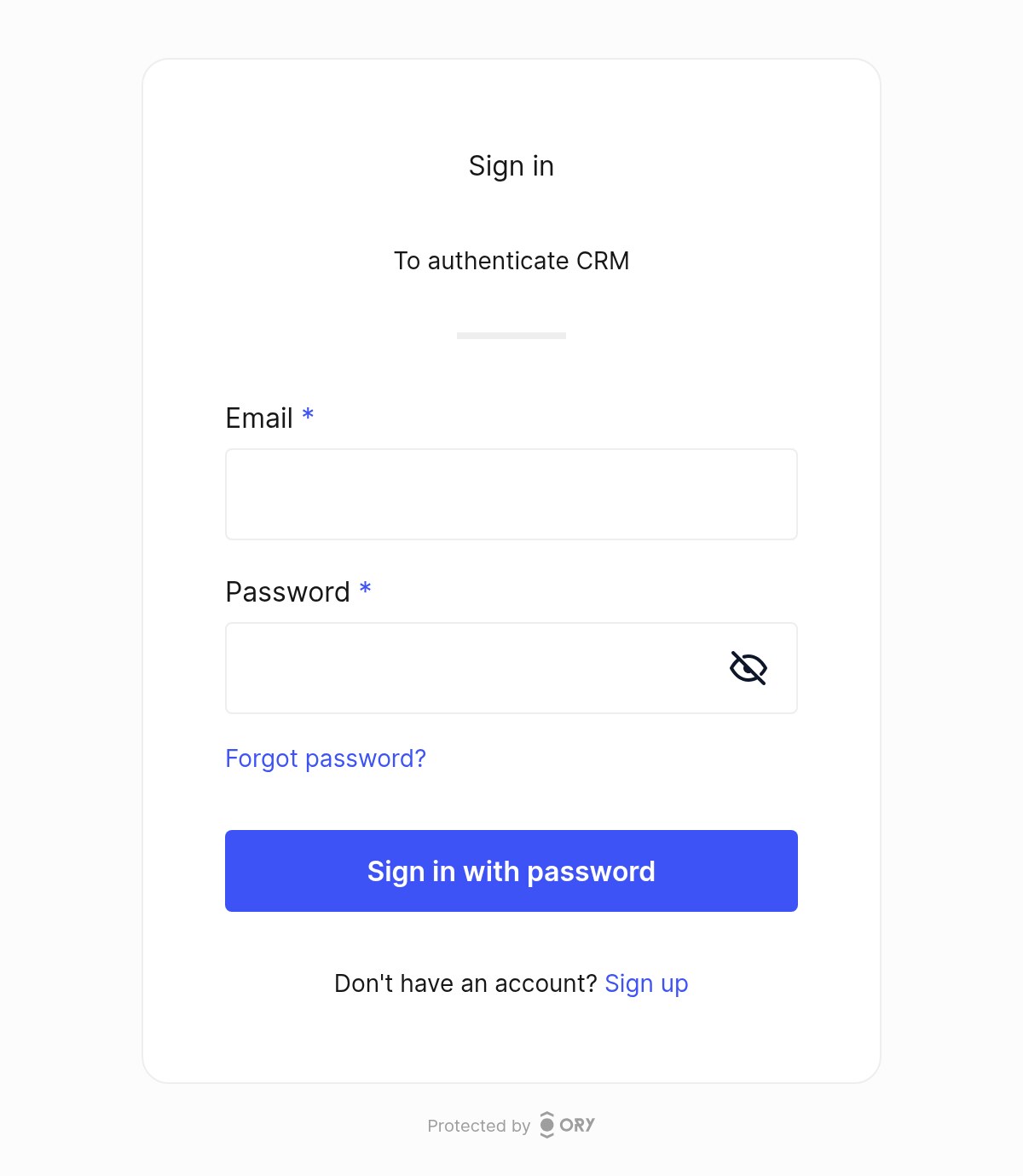
The name is what the login page shows under “Sign in”:
The Rails side
The OpenID Connect integration follows the same pattern across these stacks. Adapt the migrations to your Rails version and integrate the session handling with each application’s existing authentication code. In the companion project it came to 166 lines of Ruby per app, without blank lines and comments, and a quarter of them are back-channel logout.
# Gemfile
gem "omniauth", "~> 2.1"
gem "omniauth_openid_connect", "~> 0.8"
gem "omniauth-rails_csrf_protection", "~> 2.0"
# .env for the CRM, in development
OIDC_ISSUER=http://127.0.0.1:4444
OIDC_CLIENT_ID=crm
OIDC_CLIENT_SECRET=crm-dev-secret
OIDC_REDIRECT_URI=http://127.0.0.1:3001/auth/ory/callback
# config/initializers/omniauth.rb

# Plain-HTTP discovery only in development. In production the issuer is https.
if Rails.env.development?
  SWD.url_builder = URI::HTTP
  WebFinger.url_builder = URI::HTTP
end

Rails.application.config.middleware.use OmniAuth::Builder do
  provider :openid_connect,
    name: :ory,
    issuer: ENV.fetch("OIDC_ISSUER"),
    discovery: true,
    scope: %i[openid email profile offline_access],
    response_type: :code,
    pkce: true,
    client_options: {
      identifier: ENV.fetch("OIDC_CLIENT_ID"),
      secret: ENV.fetch("OIDC_CLIENT_SECRET"),
      redirect_uri: ENV.fetch("OIDC_REDIRECT_URI")
    }
end

OmniAuth.config.allowed_request_methods = %i[post]
The SWD and WebFinger lines exist because the openid_connect gem forces HTTPS on discovery. On a laptop with a plain HTTP issuer, discovery fails without them. Guard them with the environment check, or one day they ship.
pkce: true on a client that also has a secret looks redundant. It isn’t, and it costs nothing: a stolen authorization code is useless without the verifier that only this session knows. The last line, together with omniauth-rails_csrf_protection, makes the login start only from a POST with a CSRF token. A GET link to /auth/ory would let any site log your users in to an account it picked.
# config/routes.rb
Rails.application.routes.draw do
  get    "/auth/ory/callback", to: "sessions#create"
  get    "/auth/failure", to: "sessions#failure"
  delete "/logout", to: "sessions#destroy"
  post   "/auth/ory/backchannel_logout", to: "backchannel_logouts#create"

  get "/login", to: "sessions#new"
  root "home#show"
end
Two tables. If you already have users, you only add the column and its index. The migrations below are for Rails 8.1. On Rails 7.1, write Migration[7.1].
class AddOryIdentityToUsers < ActiveRecord::Migration[8.1]
  def change
    add_column :users, :ory_identity_id, :string
    add_index :users, :ory_identity_id, unique: true
  end
end

class CreateSessions < ActiveRecord::Migration[8.1]
  def change
    create_table :sessions do |t|
      t.references :user, null: false, foreign_key: true
      t.string :ory_sid
      t.text :id_token
      t.string :user_agent
      t.string :ip_address
      t.timestamps
    end
    add_index :sessions, :ory_sid
  end
end
The sessions table is the decision I’d defend hardest. The usual way is to put user_id in the Rails cookie session and be done. That works until you want logout in one app to log you out of the other three. Hydra will call each app server-to-server with a session id, and at that point there’s no browser and no cookie to clear. With one row per login, logout is a DELETE. The Rails 8 authentication generator uses the same model, so this will look familiar.
# app/models/session.rb
class Session < ApplicationRecord
  LIFETIME = 12.hours

  belongs_to :user

  scope :active, -> { where(created_at: LIFETIME.ago..) }
end
# app/controllers/application_controller.rb
class ApplicationController < ActionController::Base
  include Authentication
end
Every local session expires after 12 hours, whatever the cookie says, because current_session only looks at Session.active. The Kratos session lasts 720 hours, so when the local one runs out the user clicks “Sign in” once more and comes back without typing a password. Short local sessions are cheap here, and they limit the damage if a back-channel logout never arrives.
# app/controllers/concerns/authentication.rb
module Authentication
  extend ActiveSupport::Concern

  # Four apps on one domain share a cookie jar, so every app needs its own cookie name.
  SESSION_COOKIE = :"#{Rails.application.class.module_parent_name.underscore}_session_id"

  included do
    before_action :require_login
    helper_method :current_user
  end

  class_methods do
    def allow_unauthenticated(**options)
      skip_before_action :require_login, **options
    end
  end

  private

  def current_session
    return @current_session if defined?(@current_session)

    id = cookies.signed[SESSION_COOKIE]
    @current_session = id && Session.active.find_by(id: id)
  end

  def current_user
    current_session&.user
  end

  def require_login
    return if current_user

    session[:return_to] = request.fullpath if request.get?
    redirect_to login_path
  end

  def start_session_for(user, auth)
    new_session = user.sessions.create!(
      ory_sid: auth.extra.raw_info["sid"],
      id_token: auth.credentials.id_token,
      user_agent: request.user_agent,
      ip_address: request.remote_ip
    )
    cookies.signed[SESSION_COOKIE] = {
      value: new_session.id, expires: Session::LIFETIME.from_now, httponly: true, same_site: :lax
    }
  end

  def end_session
    current_session&.destroy
    cookies.delete(SESSION_COOKIE)
  end
end
Read the comment on SESSION_COOKIE twice. Cookies ignore ports, so in development all four apps on 127.0.0.1 write into one cookie jar. Production is the same if your apps live on crm.example.com and billing.example.com and someone sets cookies on .example.com. A cookie called session_id written by Billing overwrites the one from the CRM. The CRM can’t verify Billing’s signature, so you’re logged out of the CRM every time you open Billing. A name per app makes the bug impossible.
# app/controllers/sessions_controller.rb
class SessionsController < ApplicationController
  allow_unauthenticated only: %i[new create failure]

  def new
  end

  def create
    auth = request.env.fetch("omniauth.auth")
    user = User.from_ory(auth)

    return_to = session[:return_to]
    reset_session
    start_session_for(user, auth)
    redirect_to return_to || root_path
  rescue User::EmailTaken
    redirect_to login_path, alert: "An account with this email already exists. Verify your email address, then sign in again."
  end

  def failure
    redirect_to login_path, alert: "Login failed: #{params[:message]}"
  end

  def destroy
    id_token = current_session&.id_token
    end_session

    query = { id_token_hint: id_token, post_logout_redirect_uri: root_url }.compact.to_query
    redirect_to "#{ENV.fetch("OIDC_ISSUER")}/oauth2/sessions/logout?#{query}", allow_other_host: true
  end
end
<%# app/views/sessions/new.html.erb %>
<% if flash[:alert] %><p role="alert"><%= flash[:alert] %></p><% end %>
<%= button_to "Sign in with Example SSO", "/auth/ory", method: :post, data: { turbo: false } %>
reset_session before the new login drops anything an attacker planted in the session before the user signed in. It also drops return_to, so the controller reads it first. My first version did it the other way round, and every login landed on the home page. data: { turbo: false } is there because Turbo follows the redirect with fetch, and a cross-origin redirect to Hydra inside fetch fails with a CORS error.
In the target scenario Helpdesk runs on another VPS under another domain, and the OpenID Connect part of its code is the same. OpenID Connect is a chain of browser redirects plus one server-to-server call to the token endpoint, so the only thing Helpdesk needs is to reach https://id.example.com.
Users who already exist
Here’s what the ID token carries after a real login in the lab:
{
  "sub": "9152ab1a-9c69-4ce4-a31f-c0781951e842",
  "sid": "21b4e3b4-1512-4e1e-a848-3d67d2bc2d11",
  "email": "mario@example.com",
  "email_verified": true,
  "given_name": "Mario",
  "family_name": "Rossi",
  "amr": ["password"],
  "aud": ["crm"],
  "iss": "http://127.0.0.1:4444"
}
With the public subject configuration used here, sub identifies the Kratos identity. Treat it as an identifier within this issuer; email remains a mutable attribute. People change their email, and you don’t want a changed email to become a new account.
# app/models/user.rb
class User < ApplicationRecord
  class EmailTaken < StandardError; end

  has_many :sessions, dependent: :destroy

  def self.from_ory(auth)
    from_oidc_claims(auth.uid, auth.extra.raw_info)
  end

  # The one place where a Kratos identity becomes a local user.
  # Browser logins and API calls both go through here.
  def self.from_oidc_claims(sub, claims)
    user = find_by(ory_identity_id: sub)

    # First login after the switch: adopt the old account, but only on a verified email.
    if user.nil? && claims["email_verified"]
      user = find_by(email: claims["email"], ory_identity_id: nil)
    end

    if user.nil?
      raise EmailTaken, claims["email"] if exists?(email: claims["email"])
      user = new
    end

    name = [claims["given_name"], claims["family_name"]].compact.join(" ").presence
    user.update!(ory_identity_id: sub, email: claims["email"], name: name || user.name)
    user
  end
end
The email_verified check is the security line in this file. Without it, anyone could sign up in Kratos with your CFO’s email and, without verifying it, open Billing as the CFO. When the email is unverified and a local account already has it, from_oidc_claims raises EmailTaken instead of creating a second user with the same address. The login page then asks the user to verify the email first.
The method takes plain claims on purpose. Browser logins and API calls both go through it, so an account is linked the same way whichever door the user comes through first.
My first version used auth.info.name. When the token has no name claim, the gem fills info.name with the email, and the first login of every legacy user replaced their real name with their email address. Reading given_name and family_name from the raw claims fixed it.
Adoption by email covers people who sign up again. For the CRM, which has years of Devise users, I’d rather they keep their passwords. Kratos accepts bcrypt hashes on import, and Devise stores bcrypt in encrypted_password:
# lib/tasks/ory.rake
namespace :ory do
  desc "Copy users and their bcrypt password hashes into Kratos"
  task import: :environment do
    admin = URI(ENV.fetch("KRATOS_ADMIN_URL", "http://127.0.0.1:4434"))
    http = Net::HTTP.new(admin.host, admin.port)

    User.where(ory_identity_id: nil).find_each do |user|
      verified = user.confirmed_at.present?
      body = {
        schema_id: "default",
        traits: { email: user.email },
        verifiable_addresses: [
          { value: user.email, via: "email", verified: verified, status: verified ? "completed" : "pending" }
        ],
        credentials: { password: { config: { hashed_password: user.encrypted_password } } }
      }

      response = http.post("/admin/identities", body.to_json, "Content-Type" => "application/json")
      case response
      when Net::HTTPCreated
        user.update_columns(ory_identity_id: JSON.parse(response.body).fetch("id"))
      when Net::HTTPConflict
        puts "#{user.email}: already in Kratos, links on first login"
      else
        puts "#{user.email}: #{response.code} #{response.body}"
      end
    end
  end
end
I imported a Devise-style $2a$11$ hash and signed in with the old password on the first try. For Billing, read the hash from password_digest and map email-verification status from whatever mechanism Billing actually uses. If the old system did not verify email ownership, import the address as unverified.
Run the CRM import first, because it has the most users. When Billing runs its import, people who exist in both apps come back as 409 Conflict and keep their CRM password. Their Billing account gets linked by the verified-email rule on first login. Tell those people before the switch, because their Billing password stops working that day.
One warning: if your Devise config sets config.pepper, the hashes include a secret Kratos doesn’t know. Those users go through password recovery instead. Check your initializer before you promise anything.
Logout across four apps
Logout has two halves. The first one is in SessionsController#destroy above. The app deletes its own session, then sends the browser to Hydra’s logout endpoint with the ID token as a hint. Hydra ends its login session and redirects back to post_logout_redirect_uri.
The second half is the other three apps. Hydra knows which clients got tokens in this login session, and it POSTs a signed logout token to each backchannel_logout_uri:
# app/controllers/backchannel_logouts_controller.rb
# Receives Hydra's logout tokens. Validation follows
# https://openid.net/specs/openid-connect-backchannel-1_0.html#Validation
class BackchannelLogoutsController < ActionController::API
  LOGOUT_EVENT = "http://schemas.openid.net/event/backchannel-logout".freeze
  MAX_AGE = 2.minutes
  CLOCK_SKEW = 30.seconds

  class InvalidToken < StandardError; end

  def create
    claims = validate(params.require(:logout_token))

    if claims["sid"].present?
      Session.where(ory_sid: claims["sid"]).destroy_all
    else
      User.find_by(ory_identity_id: claims["sub"])&.sessions&.destroy_all
    end
    head :ok
  rescue JSON::JWT::Exception, InvalidToken => e
    Rails.logger.warn("Rejected logout token: #{e.message}")
    head :bad_request
  end

  private

  def validate(token)
    claims = OryJwks.decode(token)
    now = Time.now.to_i

    check claims["iss"] == ENV.fetch("OIDC_ISSUER"), "bad issuer"
    check Array(claims["aud"]).include?(ENV.fetch("OIDC_CLIENT_ID")), "bad audience"
    check claims["iat"].is_a?(Integer), "missing iat"
    check claims["iat"] > now - MAX_AGE.to_i, "token too old"
    check claims["iat"] < now + CLOCK_SKEW.to_i, "token from the future"
    check claims["exp"].nil? || claims["exp"] > now - CLOCK_SKEW.to_i, "token expired"
    check claims["sub"].present? || claims["sid"].present?, "no sub and no sid"
    check claims["events"].is_a?(Hash) && claims["events"].key?(LOGOUT_EVENT), "not a logout token"
    check !claims.key?("nonce"), "logout tokens carry no nonce"
    check claims["jti"].present?, "missing jti"
    check Rails.cache.write("ory/logout-jti/#{claims["jti"]}", true, unless_exist: true, expires_in: MAX_AGE * 2),
      "replayed token"
    claims
  end

  def check(condition, message)
    raise InvalidToken, message unless condition
  end
end
The checks follow the validation section of the back-channel logout spec. The token Hydra sent in my lab had aud, iss, iat, jti, sid, the logout event and no sub. The controller accepts a token with either sid or sub, and deletes by sid when it has one. The sid is the same value we saved from the ID token at login, so the lookup is one indexed query. Each jti is accepted once, and a token older than two minutes is refused.
The signature check uses Hydra’s public keys, which both this controller and the API below fetch through one small module:
# app/lib/ory_jwks.rb
# Hydra's public signing keys, cached, with one refetch when Hydra rotates them.
module OryJwks
  ALGORITHMS = %i[RS256].freeze

  def self.decode(token)
    JSON::JWT.decode(token, keys, ALGORITHMS)
  rescue JSON::JWK::Set::KidNotFound
    JSON::JWT.decode(token, keys(force: true), ALGORITHMS)
  end

  def self.keys(force: false)
    Rails.cache.fetch("ory/jwks", expires_in: 1.hour, force: force) do
      url = URI("#{ENV.fetch("OIDC_ISSUER")}/.well-known/jwks.json")
      JSON::JWK::Set.new(JSON.parse(Net::HTTP.get(url)))
    end
  end
end
The keys are cached for an hour. When Hydra rotates them, a token arrives with a key id the cache doesn’t know, and the module fetches the keys again once. Pinning the algorithm to RS256 stops a token from choosing its own.
It inherits from ActionController::API because Hydra has no CSRF token to send. The signature check replaces CSRF here. I tested it in my lab with real tokens from Hydra. The valid token returned 200, and the CRM session was gone on the next page load. The same token sent a second time returned 400, and so did a token I held for two minutes before sending it. Billing’s token sent to the CRM endpoint returned 400 too, because the audience was billing.
Two things surprised me. On my laptop, the firewall blocks containers from reaching the host, so Hydra’s POST to host.docker.internal timed out after 30 seconds. Hydra dispatches these calls asynchronously, so the browser’s logout finished at once. Back-channel logout requires Hydra to reach every registered application callback. Configure and test that connectivity in each environment. In development, Rails must listen on an address reachable from Docker and allow host.docker.internal. Don’t build on retries: if a call never arrives, the 12-hour local session lifetime is what ends that session.
The second surprise is the Kratos session. Hydra and Kratos maintain separate sessions. In this configuration, the UI accepts Hydra’s logout request without ending the Kratos session, as you can see in the UI’s logout route. My subsequent login required password confirmation. If your logout policy requires ending both sessions, integrate Kratos’s browser logout flow as well.
The fourth app: a React SPA and a Rails API
A single-page app can’t keep a secret. Anything in the JavaScript bundle is public. So dashboard is a public client, --token-endpoint-auth-method none, and PKCE is what protects the code exchange. Use an OIDC library for the browser part, such as oidc-client-ts, and point it at the issuer and client_id: "dashboard".
The Rails API receives Authorization: Bearer <access token> on each request. We registered the client with --access-token-strategy jwt, so the access token is a JWT that Hydra signed, and with --audience https://api.example.com. The SPA asks for that audience in the authorization request (audience=https://api.example.com), and Hydra puts it in the token’s aud. client_id identifies the client requesting the token. The audience identifies the resource the token is for, and that’s what the API checks. Ory explains this in its audience guide. The API verifies the signature with Hydra’s public keys and doesn’t call Hydra on the hot path.
# app/controllers/concerns/ory_bearer_auth.rb
# Authenticates API requests that carry a Hydra JWT access token.
module OryBearerAuth
  extend ActiveSupport::Concern

  CLOCK_SKEW = 30.seconds

  included do
    before_action :authenticate_bearer!
    attr_reader :current_user
  end

  private

  def authenticate_bearer!
    token = request.authorization.to_s[/\ABearer (.+)\z/, 1]
    return head(:unauthorized) if token.blank?

    claims = OryJwks.decode(token)
    return head(:unauthorized) unless valid_access_token?(claims)

    @current_user = User.find_by(ory_identity_id: claims["sub"]) || link_user(token, claims["sub"])
  rescue JSON::JWT::Exception
    head :unauthorized
  rescue User::EmailTaken
    head :forbidden
  end

  def valid_access_token?(claims)
    now = Time.now.to_i
    claims["iss"] == ENV.fetch("OIDC_ISSUER") &&
      Array(claims["aud"]).include?(ENV.fetch("API_AUDIENCE")) &&
      claims["sub"].present? &&
      claims["exp"].is_a?(Integer) && claims["exp"] > now - CLOCK_SKEW.to_i &&
      (claims["nbf"].nil? || claims["nbf"] <= now + CLOCK_SKEW.to_i)
  end

  # First API call from someone this app hasn't seen: the access token has no email,
  # so ask Hydra's userinfo endpoint and link the account the same way a browser login does.
  def link_user(token, sub)
    uri = URI("#{ENV.fetch("OIDC_ISSUER")}/userinfo")
    response = Net::HTTP.get_response(uri, "Authorization" => "Bearer #{token}")
    raise JSON::JWT::VerificationFailed, "userinfo #{response.code}" unless response.is_a?(Net::HTTPSuccess)

    info = JSON.parse(response.body)
    raise JSON::JWT::VerificationFailed, "userinfo sub mismatch" unless info["sub"] == sub

    User.from_oidc_claims(sub, info)
  end
end
class Api::MeController < ActionController::API
  include OryBearerAuth

  def show
    render json: { id: current_user.id, email: current_user.email }
  end
end
JSON::JWT.decode checks the signature and nothing else. The concern checks the issuer, the audience, the subject, exp and nbf. The access token carries no email, so the first time the API meets a subject it asks Hydra’s userinfo endpoint and links the account through User.from_oidc_claims, the same method the browser login uses. Before this, a user who called the API first and then signed in through the browser hit a duplicate-email error. In my lab, a valid Dashboard token returned 200 and linked a legacy account by its verified email. A token without the API audience returned 401, and so did a token with one character changed. A token for an unverified email that clashed with an existing account returned 403.
# .env for the API, next to the OIDC_ variables
API_AUDIENCE=https://api.example.com
With local signature verification alone, the API does not observe provider-side token revocation. Short access-token lifetimes limit that window, 15 minutes in the production config below, and the SPA uses its refresh token after that. If you need revocation checks on each request, use introspection or an explicit revocation mechanism. Caching successful introspection responses introduces a revocation delay equal to the cache lifetime.
Going to production
In production I put all three Ory services behind one host, id.example.com, with Caddy in front for TLS. One host means one cookie domain, and the cookie problems of the development setup disappear. The paths don’t collide: Hydra owns /oauth2/*, /.well-known/* and /userinfo, Kratos sits under /kratos/*, and the login UI gets everything else.
# Caddyfile
{$SSO_HOST} {
	# Hydra: the OpenID Connect provider your Rails apps talk to
	@hydra path /oauth2/* /.well-known/* /userinfo
	handle @hydra {
		reverse_proxy hydra:4444
	}

	# Kratos public API, under a prefix so its cookies stay on this host
	handle_path /kratos/* {
		reverse_proxy kratos:4433
	}

	# Everything else is the login, registration and account UI
	handle {
		reverse_proxy login-ui:4455
	}
}
# docker-compose.yml (production)
name: ory-sso

services:
  caddy:
    image: caddy:2-alpine
    restart: unless-stopped
    ports:
      - "80:80"
      - "443:443"
    environment:
      SSO_HOST: ${SSO_HOST:?}
    volumes:
      - ./Caddyfile:/etc/caddy/Caddyfile:ro
      - caddy-data:/data
    depends_on: [login-ui, kratos, hydra]

  postgres:
    image: postgres:17-alpine
    restart: unless-stopped
    environment:
      POSTGRES_USER: ory
      POSTGRES_PASSWORD: ${ORY_DB_PASSWORD:?set ORY_DB_PASSWORD in .env}
      POSTGRES_DB: ory
    volumes:
      - ./ory/postgres/init.sql:/docker-entrypoint-initdb.d/init.sql:ro
      - ory-postgres:/var/lib/postgresql/data
    healthcheck:
      test: ["CMD-SHELL", "pg_isready -U ory"]
      interval: 3s
      retries: 20

  kratos-migrate:
    image: oryd/kratos:v26.2.0
    command: migrate sql -e --yes
    environment:
      DSN: postgres://ory:${ORY_DB_PASSWORD}@postgres:5432/kratos?sslmode=disable
    depends_on:
      postgres: { condition: service_healthy }

  kratos:
    image: oryd/kratos:v26.2.0
    restart: unless-stopped
    command: serve -c /etc/config/kratos/kratos.yml --watch-courier
    environment:
      DSN: postgres://ory:${ORY_DB_PASSWORD}@postgres:5432/kratos?sslmode=disable
      SECRETS_COOKIE: ${KRATOS_COOKIE_SECRET:?}
      SECRETS_CIPHER: ${KRATOS_CIPHER_SECRET:?}
      COURIER_SMTP_CONNECTION_URI: ${SMTP_URI:?}
    volumes:
      - ./ory/kratos:/etc/config/kratos:ro
    depends_on:
      kratos-migrate: { condition: service_completed_successfully }

  hydra-migrate:
    image: oryd/hydra:v26.2.0
    command: migrate sql up -e --yes
    environment:
      DSN: postgres://ory:${ORY_DB_PASSWORD}@postgres:5432/hydra?sslmode=disable
    depends_on:
      postgres: { condition: service_healthy }

  hydra:
    image: oryd/hydra:v26.2.0
    restart: unless-stopped
    command: serve all -c /etc/config/hydra/hydra.yml
    environment:
      DSN: postgres://ory:${ORY_DB_PASSWORD}@postgres:5432/hydra?sslmode=disable
      SECRETS_SYSTEM: ${HYDRA_SYSTEM_SECRET:?}
    volumes:
      - ./ory/hydra:/etc/config/hydra:ro
    depends_on:
      hydra-migrate: { condition: service_completed_successfully }

  login-ui:
    image: oryd/kratos-selfservice-ui-node:v26.2.0
    restart: unless-stopped
    environment:
      PORT: 4455
      KRATOS_PUBLIC_URL: http://kratos:4433
      KRATOS_BROWSER_URL: https://${SSO_HOST}/kratos
      HYDRA_ADMIN_URL: http://hydra:4445
      COOKIE_SECRET: ${UI_COOKIE_SECRET:?}
      CSRF_COOKIE_NAME: __Host-sso_csrf
      CSRF_COOKIE_SECRET: ${UI_CSRF_SECRET:?}
    depends_on: [kratos, hydra]

volumes:
  ory-postgres:
  caddy-data:
# .env (never commit this one)
SSO_HOST=id.example.com
ORY_DB_PASSWORD=
KRATOS_COOKIE_SECRET=
KRATOS_CIPHER_SECRET=      # exactly 32 characters
HYDRA_SYSTEM_SECRET=
UI_COOKIE_SECRET=
UI_CSRF_SECRET=
SMTP_URI=smtps://apikey:secret@smtp.example.com:465/
The admin ports, 4434 and 4445, aren’t in any ports: list. Only containers on the Compose network can reach them. Anyone who reaches Hydra’s admin API can create a client with any redirect URL they want, and anyone who reaches Kratos’s admin API can read and edit every identity.
The production project is called ory-sso and the development one ory-sso-dev. Different names let both run on one Docker host without sharing containers or volumes.
Clients in production come from a different script. It reads every URL and secret from the environment, and it creates or updates each client, so ids and secrets stay stable when you run it again:
#!/usr/bin/env bash
# ory-production/register-clients.sh
# Creates or updates one OAuth2 client per app. Run it on the server, next to docker-compose.yml.
# Every URL and secret comes from the environment, so nothing secret lives in the repo:
#
#   CRM_URL=https://crm.example.com CRM_SECRET=... \
#   BILLING_URL=https://billing.example.com BILLING_SECRET=... \
#   HELPDESK_URL=https://helpdesk.other-domain.it HELPDESK_SECRET=... \
#   DASHBOARD_URL=https://dashboard.example.com API_AUDIENCE=https://api.example.com \
#   ./register-clients.sh
#
# Generate secrets with: openssl rand -hex 32
set -euo pipefail

HYDRA="docker compose exec -T hydra hydra"
ADMIN="--endpoint http://127.0.0.1:4445" # inside the container, the admin API isn't published

# Updates the client when it exists, creates it otherwise. Ids and secrets stay stable.
upsert() {
  local id=$1; shift
  if $HYDRA get oauth2-client "$id" $ADMIN >/dev/null 2>&1; then
    $HYDRA update oauth2-client "$id" $ADMIN "$@" --format json | jq -c '{client_id, redirect_uris}'
  else
    $HYDRA create oauth2-client --id "$id" $ADMIN "$@" --format json | jq -c '{client_id, redirect_uris}'
  fi
}

server_app() {
  local id=$1 name=$2 url=$3 secret=$4
  upsert "$id" \
    --name "$name" \
    --secret "$secret" \
    --grant-type authorization_code,refresh_token \
    --response-type code \
    --scope openid,offline_access,email,profile \
    --token-endpoint-auth-method client_secret_basic \
    --redirect-uri "${url}/auth/ory/callback" \
    --post-logout-callback "${url}/" \
    --backchannel-logout-callback "${url}/auth/ory/backchannel_logout" \
    --skip-consent \
    --skip-logout-consent
}

server_app crm      "CRM"      "${CRM_URL:?}"      "${CRM_SECRET:?}"
server_app billing  "Billing"  "${BILLING_URL:?}"  "${BILLING_SECRET:?}"
server_app helpdesk "Helpdesk" "${HELPDESK_URL:?}" "${HELPDESK_SECRET:?}"

upsert dashboard \
  --name "Dashboard" \
  --grant-type authorization_code,refresh_token \
  --response-type code \
  --scope openid,offline_access,email,profile \
  --token-endpoint-auth-method none \
  --access-token-strategy jwt \
  --audience "${API_AUDIENCE:?}" \
  --redirect-uri "${DASHBOARD_URL:?}/callback" \
  --post-logout-callback "${DASHBOARD_URL}/" \
  --allowed-cors-origin "${DASHBOARD_URL}" \
  --skip-consent \
  --skip-logout-consent
Hydra refuses client secrets shorter than six characters. I found that out by passing a as a test secret.
There’s no --dev flag on either server, and the secrets come from the environment. Ory maps SECRETS_COOKIE to secrets.cookie in the YAML, so the files in the repo hold no secrets.
My first production attempt had Caddy restarting in a loop. {$SSO_HOST} in a Caddyfile reads the environment of the Caddy container, and Compose doesn’t pass your .env into a container unless you name the variable. The environment: block on the caddy service is the fix.
hydra.yml changes the URLs and shortens the access token:
# ory/hydra/hydra.yml (production)
serve:
  cookies:
    same_site_mode: Lax
  public:
    cors:
      enabled: true
      allowed_origins:
        - https://dashboard.example.com
      allowed_headers: [Authorization, Content-Type]
  tls:
    enabled: false # Caddy terminates TLS

urls:
  self:
    issuer: https://id.example.com
  login: https://id.example.com/login
  consent: https://id.example.com/consent
  logout: https://id.example.com/logout

oidc:
  subject_identifiers:
    supported_types: [public]

ttl:
  access_token: 15m
  refresh_token: 720h
  id_token: 1h
  auth_code: 10m

strategies:
  access_token: jwt
In kratos.yml, every http://127.0.0.1:4455 becomes https://id.example.com, and the rest is short:
# ory/kratos/kratos.yml (production changes only)
serve:
  public:
    base_url: https://id.example.com/kratos/

session:
  cookie:
    path: /

log:
  format: json
  leak_sensitive_values: false

courier:
  smtp:
    from_address: no-reply@example.com
# delete the secrets: block and courier.smtp.connection_uri, they come from the environment
I ran this exact layout on my laptop as id.localhost:8443, with Caddy’s internal certificates. A new user signed up and verified the email. The browser then came back to the CRM’s callback with a code. The code turned into a JWT access token valid for 900 seconds and a refresh token. The Kratos session cookie was set on /, on the one host, next to Hydra’s.
Before real users arrive, check three things. Back up the PostgreSQL volume, because it holds every password in the company. Keep HYDRA_SYSTEM_SECRET somewhere safe, because Hydra encrypts data in its database with it. And send a recovery email to yourself through the real SMTP server, because the day you find out it’s broken is the day someone forgot their password.
What I learned
Two parts of Ory are better than one. Kratos alone works within one cookie domain scope and an Ory-specific API. Hydra in front turns the whole thing into standard OpenID Connect, and the Rails code is the code you’d write for any provider.
Store sub as the key. Link old accounts by email once, only when email_verified is true. From then on the Kratos identity id is what identifies a person, even after they change their email.
Put sessions in a table. Back-channel logout arrives with a session id and no browser. A sessions table turns it into one indexed DELETE.
Trailing slashes are a config bug class of their own. The issuer must match byte for byte, and HYDRA_ADMIN_URL must not end in /. Consistent issuer URLs and admin base URLs prevent discovery and routing errors.
Name your cookies per app. Four apps on one host share one cookie jar, in development always and in production more often than you’d think.
Test logout as hard as login. Login worked on my first try. Logout took me most of the lab, and nobody files a bug when logout half works.
Ory provides the identity and token services; the application work is configuring clients, mapping existing users and defining session behavior.