Why I Built ActiveCanvas: The CMS Your Rails App Already Deserves
Every Rails application I’ve ever shipped has eventually needed a landing page.
A landing page: The kind of page that marketing people care about. The kind with a headline, a hero image, a call to action, some testimonials, and a pricing table. The kind of page where someone changes the copy every two weeks because the conversion rate is down by 0.3%.
I’ve been building Rails applications for over a decade. I’ve launched SaaS products, internal tools, client platforms, and side projects. And every single time, the same problem shows up. The app is running. The features work. The backend is solid. And then someone asks: “Where does the website go?”
That question has haunted me for years.
The two bad options
If you’re a Rails developer who has launched anything, you know the drill. You have two choices.
Option A: You put the pages inside your Rails app.
This sounds reasonable at first. You create a PagesController, add some views, write some HTML with Tailwind or Bootstrap, and ship it. The homepage lives at the root. The pricing page is at /pricing. The about page is at /about. Everything is in one place. One deploy. One domain. Simple.
Until it isn’t.
The problem with static pages living inside your Rails app is that only developers can change them. Your marketing person wants to update the hero text? That’s a pull request. Your co-founder wants to swap out a testimonial? That’s a deploy. Someone notices a typo at 11pm on a Sunday? That’s a Slack message to the developer on call.
You become the bottleneck. The person who built the entire product is now spending Tuesday afternoons changing the font size on a landing page because the marketing team can’t touch the codebase. It’s a waste of your time, their time, and everyone’s patience.
I’ve lived this exact scenario with Consultala. We had beautiful pages, all hand-coded in ERB. Every small change required a developer. It was maddening.
Option B: You set up WordPress on a separate domain.
This is what most people end up doing. You run your Rails app at app.yourproduct.com and WordPress at www.yourproduct.com. Or you get creative with nginx and reverse proxies, routing some paths to WordPress and others to Rails.
Now you have two applications. Two servers. Two deployment pipelines. Two sets of dependencies. Two security surfaces. Two things that can break at 3am.
WordPress is a fine CMS. It’s proven, it’s flexible, and millions of people know how to use it. But running it alongside a Rails app introduces a level of operational complexity that is completely out of proportion with the problem you’re solving. You just want editable pages. You don’t want to manage a PHP runtime, a MySQL database, and a WordPress update cycle on top of your existing stack.
And the developer experience is miserable. Your design system lives in your Rails app. Your fonts, your colors, your component library. None of that exists in WordPress. So you either duplicate everything in a WordPress theme (and keep it in sync forever) or you accept that your marketing site and your app will look like they were built by two different companies. Because they were.
I’ve been through this too. With multiple projects. It never feels right. It’s always a compromise.
The real problem nobody talks about
Here’s what bothers me most about both options. They force you to choose between developer control and team accessibility. You either lock the pages inside the codebase where only engineers can touch them, or you move them outside the codebase where engineers lose control over the stack.
That’s a false choice. We shouldn’t have to pick.
Rails solved this problem for every other part of our application. We have admin panels that let non-technical users manage data. We have rich text editors with Action Text. We have file uploads with Active Storage. Rails has always been about giving developers the tools to build things that other people can use.
But for page management? For the actual website that represents your product to the world? We’ve had nothing. A blank spot in the framework’s otherwise comprehensive toolkit.
I kept waiting for someone to build it. I looked at every CMS gem, every headless CMS integration, every page builder that claimed to work with Rails. They all fell short. Either they required a separate frontend framework, or they depended on external services, or they were so complicated to set up that you might as well have used WordPress.
So I stopped waiting and started building.
ActiveCanvas
ActiveCanvas is a Rails engine. You add it to your Gemfile, run a migration, mount it in your routes, and you have a full CMS inside your Rails application. No separate server. No external service. No iframe tricks. It lives in your monolith, right next to the rest of your code.
The core idea is simple. Your Rails app should be able to serve editable pages without losing any of the benefits of being a Rails app. Same deployment. Same domain. Same authentication. Same design system. One bundle install and you’re done.
gem 'active_canvas'
Rails.application.routes.draw do
  mount ActiveCanvas::Engine, at: "/"
  # use '/' if you want to control the root page with active_canvas
end
That’s the setup. Your marketing team gets a visual editor. Your developers keep their sanity.
The visual editor
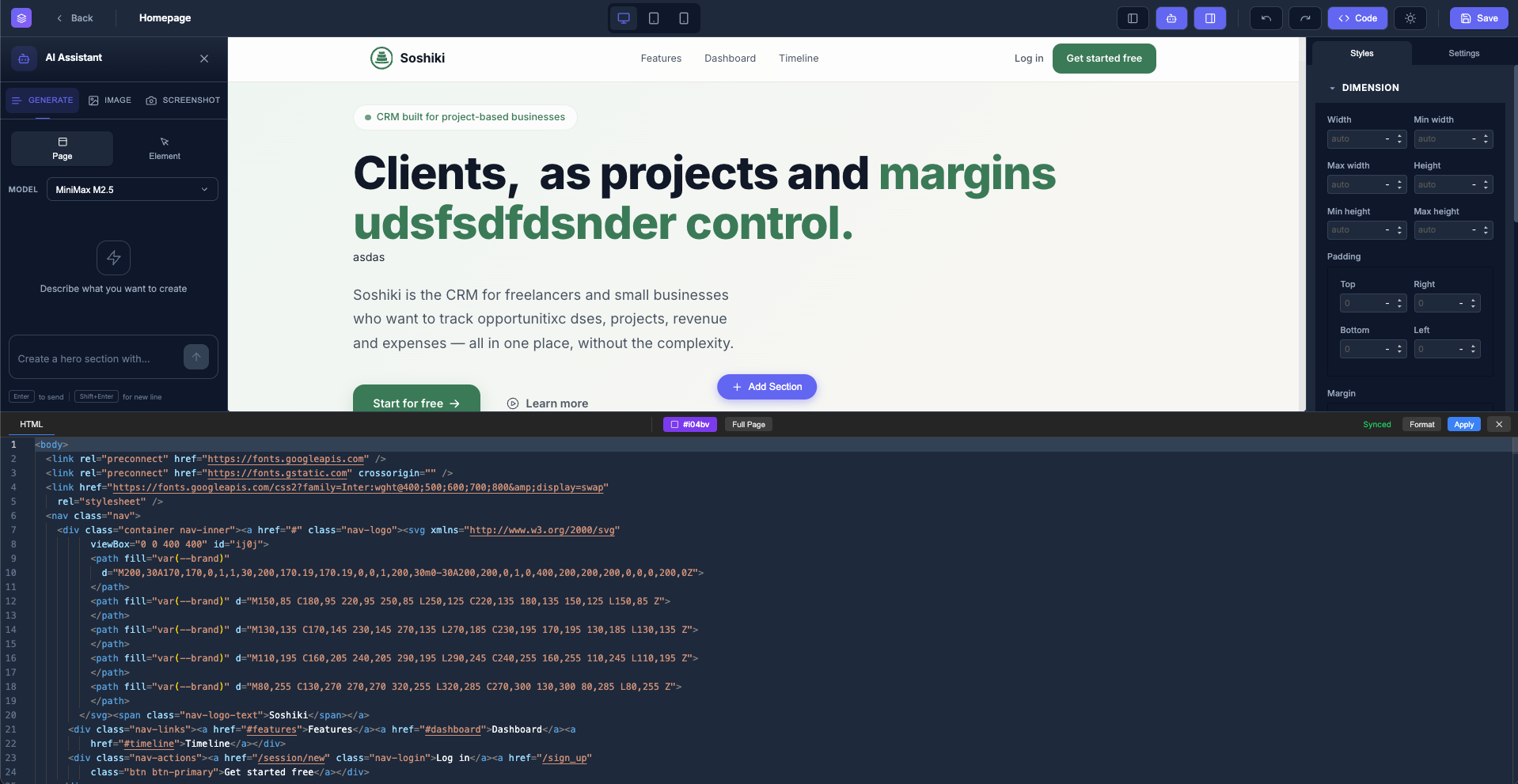
The editor is powered by GrapeJS, one of the best open-source page builders available. It gives you drag-and-drop editing, live preview, responsive design tools, and a clean block-based interface. You can build pages visually without writing code, but you can also drop into the source when you need to.
This was a deliberate choice. I wanted something that marketing people could actually use without calling a developer. Not a markdown editor. Not a WYSIWYG that produces garbage HTML. A real page builder where you drag components onto a canvas, style them visually, and see exactly what the final page will look like.
But I also wanted developers to be able to create custom blocks. The kind of blocks that match your product’s design system. A pricing table that uses your exact Tailwind classes. A testimonial carousel that matches the rest of your app. A hero section with your specific layout. You build the blocks once, and your team uses them forever.
The AI that actually helps
I added AI content generation to ActiveCanvas because it solves a real problem, not because it’s trendy.
If you’ve ever stared at a blank landing page and wondered what to write, you know the feeling. Writer’s block kills momentum. And for small teams without a dedicated copywriter, it can delay a launch by weeks.
ActiveCanvas can generate text and images, convert screenshots to code, and stream responses back to the editor. It works with OpenAI, Anthropic, or OpenRouter. You pick your provider, plug in your API key, and your editor gets a writing assistant.
The key word is “assistant.” The AI doesn’t replace your voice. It gives you a starting point. A first draft you can edit, rewrite, and make your own. In my experience, going from a blank page to a rough draft is the hardest part. Going from a rough draft to a polished page is much easier.
Tailwind CSS in production, not just in the editor
This is the feature I’m most proud of, because it solves a problem that every other page builder ignores.
Most visual editors use inline styles or a bloated CSS framework loaded via CDN. That works in the editor, but it’s terrible in production. You end up serving megabytes of unused CSS to your visitors. Your Lighthouse score tanks. Your page load time suffers.
ActiveCanvas does something different. In the editor, it uses the Tailwind CDN for instant feedback. You drag a block, apply some classes, and see the result immediately. But when you publish a page, ActiveCanvas compiles only the CSS that page actually uses. Per-page compiled CSS. No bloat. No CDN dependency in production.
If you prefer vanilla CSS, the option is there too. But for Tailwind users, this is the workflow you’ve always wanted. Design with the full utility library in the editor. Ship only what you need in production.
Page versioning because mistakes happen
Every change to a page is tracked automatically. You can see what changed, who changed it, and when. If someone publishes a broken layout at midnight, you click one button and roll back to the previous version.
This is the kind of feature that sounds boring until you need it. And you will need it. I’ve seen entire landing pages wiped out by an accidental save. I’ve seen carefully tuned copy overwritten by someone who didn’t know what they were doing. Versioning is insurance. It costs nothing when things go well and saves everything when things go wrong.
Media library with Active Storage
ActiveCanvas uses Active Storage for file management. If your Rails app already uses Active Storage (and it probably does), your existing setup just works. Local disk, S3, GCS, Azure. Whatever you have configured, ActiveCanvas uses it.
This means no separate media management system. No third-party image hosting. No CDN configuration outside of what you already have. Your images, your videos, your PDFs. All managed through the same infrastructure you already trust.
Why a Rails engine and not a standalone app
I get this question a lot. Why not build ActiveCanvas as a standalone CMS? Why tie it to Rails?
Because the whole point is to eliminate the second application. The whole point is that you don’t need WordPress, or Contentful, or Strapi, or any other separate system. Your Rails app is the system. ActiveCanvas extends it.
Rails engines are one of the most underrated features of the framework. They let you build self-contained functionality that plugs into any Rails app with zero friction. Same ORM, same view layer, same routing, same everything. It’s not an integration. It’s a part of your app.
When someone visits your landing page, they’re hitting your Rails router, your Rails middleware, your Rails server. There’s no proxy. There’s no redirect. There’s no “marketing site” and “app” distinction. It’s all one thing. As it should be.
The workflow I always wanted
Let me describe what my workflow looks like now.
I run rails new. I build my application. I add ActiveCanvas. I run the migration. I mount the engine. I create a few custom blocks that match my design system. Then I hand the keys to my team.
They build the landing page. They write the copy. They swap images. They create the pricing page, the about page, the blog. They publish updates whenever they want. No pull request. No deploy. No Slack message.
I keep building features. They keep improving the website. We stay out of each other’s way. And everything lives in one codebase, one server, one domain.
This is what it should have been all along.
The deeper motivation
I’ve launched Consultala, SopranoVillas, Alloggiati.pro, LoopCentr, and a dozen other products over the years. Every single one went through the same painful dance. Build the app, then figure out the website. Hand-code it or outsource it. Make it look consistent with the app or accept that it won’t. Maintain it forever or let it rot.
ActiveCanvas exists because I got tired of that dance. I wanted one tool, one gem, one bundle install that would end the conversation forever. “Where does the website go?” Inside your Rails app. Done.
Rails has always been about developer happiness. It’s about doing more with less, about eliminating unnecessary complexity, about building something real without an army of engineers. ActiveCanvas is built with that same philosophy. One gem. No external dependencies. MIT licensed. Open source.
Your Rails app deserves a canvas. Now it has one.
Check it out at active-canvas.com. It’s still in alpha and I hope your feedback will help me improve it.